What's new in Car Manager 2.3: car photo and expense export
Published November 16, 2026
In short: Car Manager 2.3 adds a photo for each vehicle, and you can export your expenses to Excel, PDF or CSV: the file is sent to your email. Service reminders now arrive around 8 a.m. your local time, and if you haven't logged your odometer in a while and a service is close, Car Manager will ask you to update it. The update is out for iPhone and Android, and the web version already has everything.
| What's new | Where |
|---|---|
| A vehicle photo, or an icon in the vehicle's color if there is no photo | Browser, iPhone, Android |
| Expense export to Excel, PDF and CSV by email | Browser, iPhone, Android |
| Service reminders around 8:00 your local time | Push, email, in-app notifications |
| Hints to update your odometer when a service is close | Push and email |
| Updated Privacy Policy and Terms of Use | Website |
Vehicle photo
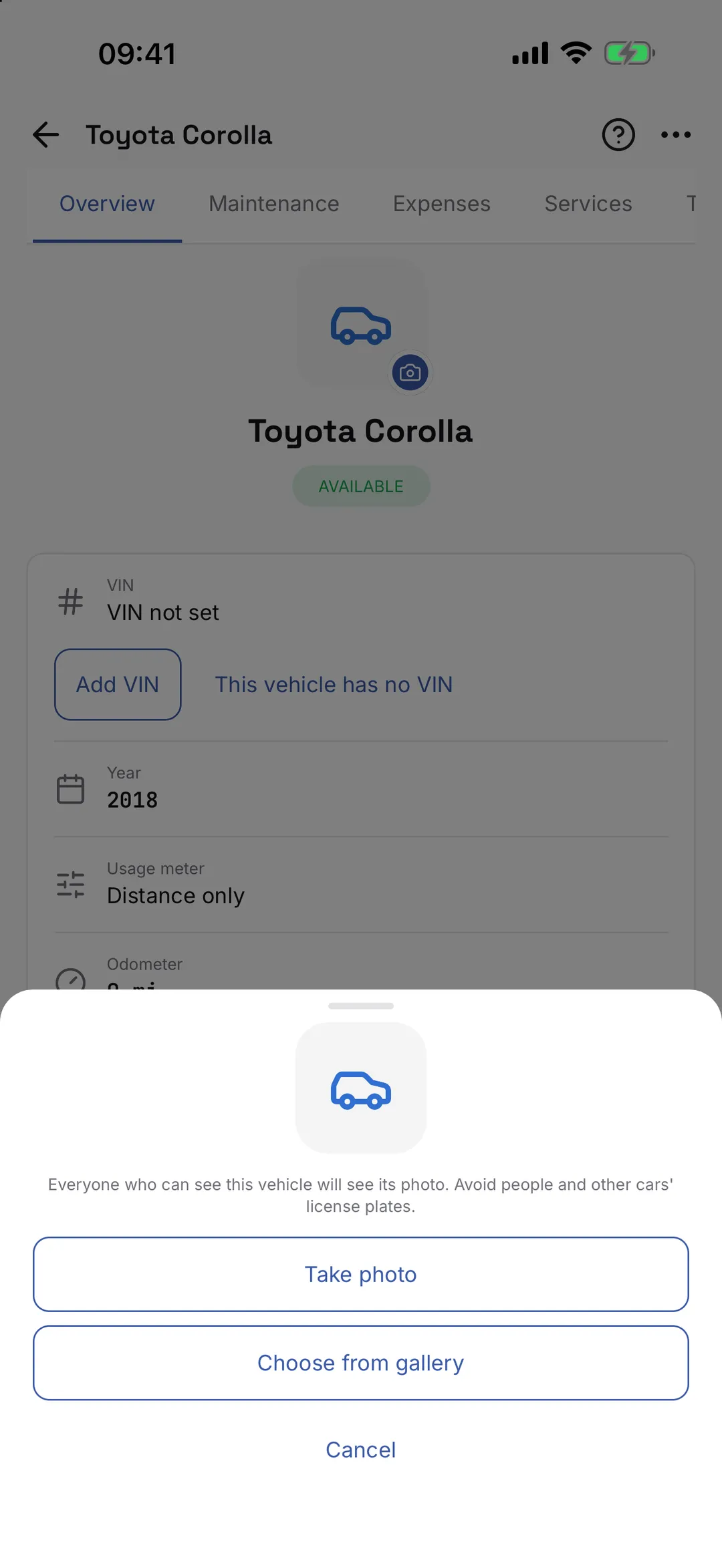
Every vehicle in Car Manager can now have its own photo, which makes it easier to tell your vehicles apart in the garage and on the home screen.
In the app, open a vehicle and tap its icon in the header: you can "Take photo" or "Choose from gallery", and later "Change photo" or "Remove photo". In the browser, you upload the photo from a file. JPEG, PNG and WebP files up to 5 MB work.
- No photo means an icon in the vehicle's color. Car Manager takes the color from the "Color" field on the vehicle card and tints the vehicle type icon with it.
- Everyone with access to the vehicle can see the photo. In a family, any member can change it. Avoid photographing people or other drivers' license plates.
- The photo is shown on the app's home screen, in the vehicle list and on the vehicle card.
Export expenses to Excel, PDF and CSV
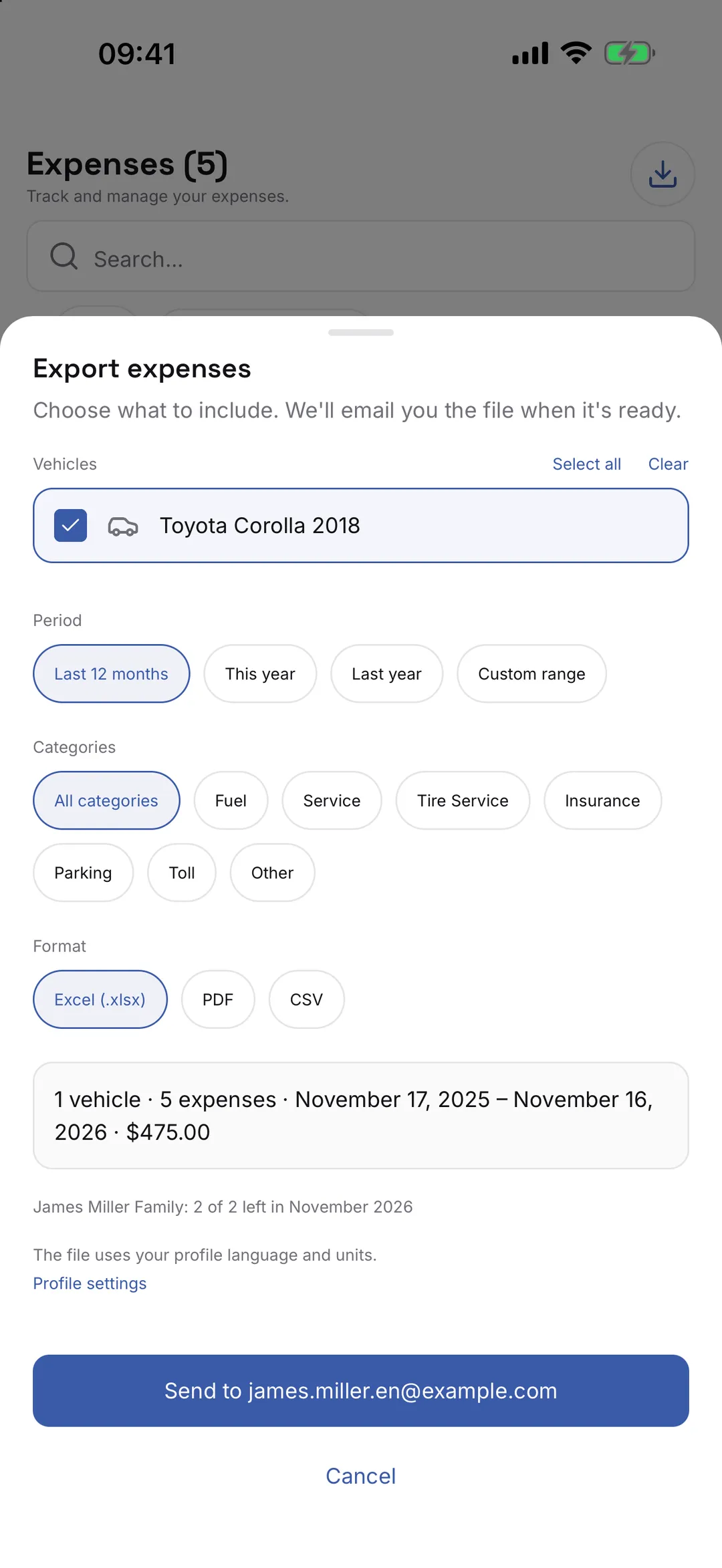
You can now export your Car Manager expenses to a file: for bookkeeping, taxes or your own spreadsheet.
In the browser, click "Export expenses" in the expense list, the vehicle list or on a vehicle's page. In the app, tap the export icon at the top of the expenses and vehicles screens; on a vehicle's page the command is in the "⋮" menu. Then choose:
- vehicles: one, several or all;
- period: last 12 months, this year, last year or a custom range;
- categories: all by default;
- format: Excel (the default), PDF or CSV.
Car Manager prepares the file and sends it to the email of your account, and a notification appears in the app. The file includes only completed expenses, totals for each vehicle and the cost per mile or kilometer. Language and units follow your profile.
| Plan | Exports per month |
|---|---|
| Free | 2 |
| Family Basic | 3 |
| Family Pro | 5 |
The counter is shared across the family and resets on the 1st of every month. If an export fails, it does not count against your limit.
Service reminders around 8 a.m. your local time
Car Manager used to send service and insurance reminders at the same moment for everyone, so in different countries they landed either early in the morning or in the middle of the day. Now a reminder arrives around 8 a.m. your local time, by push, email and in-app notification, depending on what you have turned on.
Car Manager takes your time zone from your phone or browser, so there is nothing to set up.
Hints to update your odometer
Car Manager counts mileage-based service from your last odometer reading. If you haven't logged one in a while, Car Manager may not notice that a service is already close. Now it backs you up with two hints:
- Your mileage hasn't been updated for over a week, and a service looks close based on your trips. Car Manager estimates your current mileage from your fill-ups and asks you to enter your odometer reading.
- Less than one tank is left until a service. Car Manager knows how far you usually drive on one fill-up and warns you in advance.
Hints arrive by push and email, no more than twice per service item. For Car Manager to calculate them, you need at least a month of fill-up history. You can turn them off together with your other push and email notifications.
Other changes
- The Privacy Policy and Terms of Use are updated (version of November 10, 2026): they describe how vehicle photos and the other new features work.
- Minor improvements and fixes.
How to update
Get the latest version of Car Manager on the App Store or Google Play. The web version updates by itself. If you are just starting out, see the guide How to get started with Car Manager: sign-up and family, and everything the app can do is covered in Car Manager: car expense tracker and maintenance app.
FAQ
Can I download the expense export directly in Car Manager? No. Car Manager sends the file to the email of your account and shows a notification in the app when the file is ready.
How many times a month can I export expenses in Car Manager? It depends on your plan: 2 on the free plan, 3 on Family Basic and 5 on Family Pro. The counter resets on the 1st of every month.
Who can see my vehicle's photo in Car Manager? Everyone who has access to that vehicle in Car Manager, for example the members of your family.
What time do service reminders arrive in Car Manager? Around 8 a.m. your local time. Car Manager takes your time zone from your phone or browser.
Why didn't Car Manager send me a hint to update my odometer? A hint needs at least a month of fill-up history, and it arrives only when a service is estimated to be close. It does not work for electric vehicles and hybrids yet.