Car Manager: car expense tracker and maintenance app
Published November 6, 2026
In short: Car Manager is an app for tracking the expenses, maintenance and mileage of your car, motorcycle or scooter. Car Manager sends service reminders, keeps a fuel log and shows what each vehicle really costs you. You can share your garage with your household. Car Manager works in the browser, on iPhone and on Android, and the free plan has no time limit and needs no credit card.
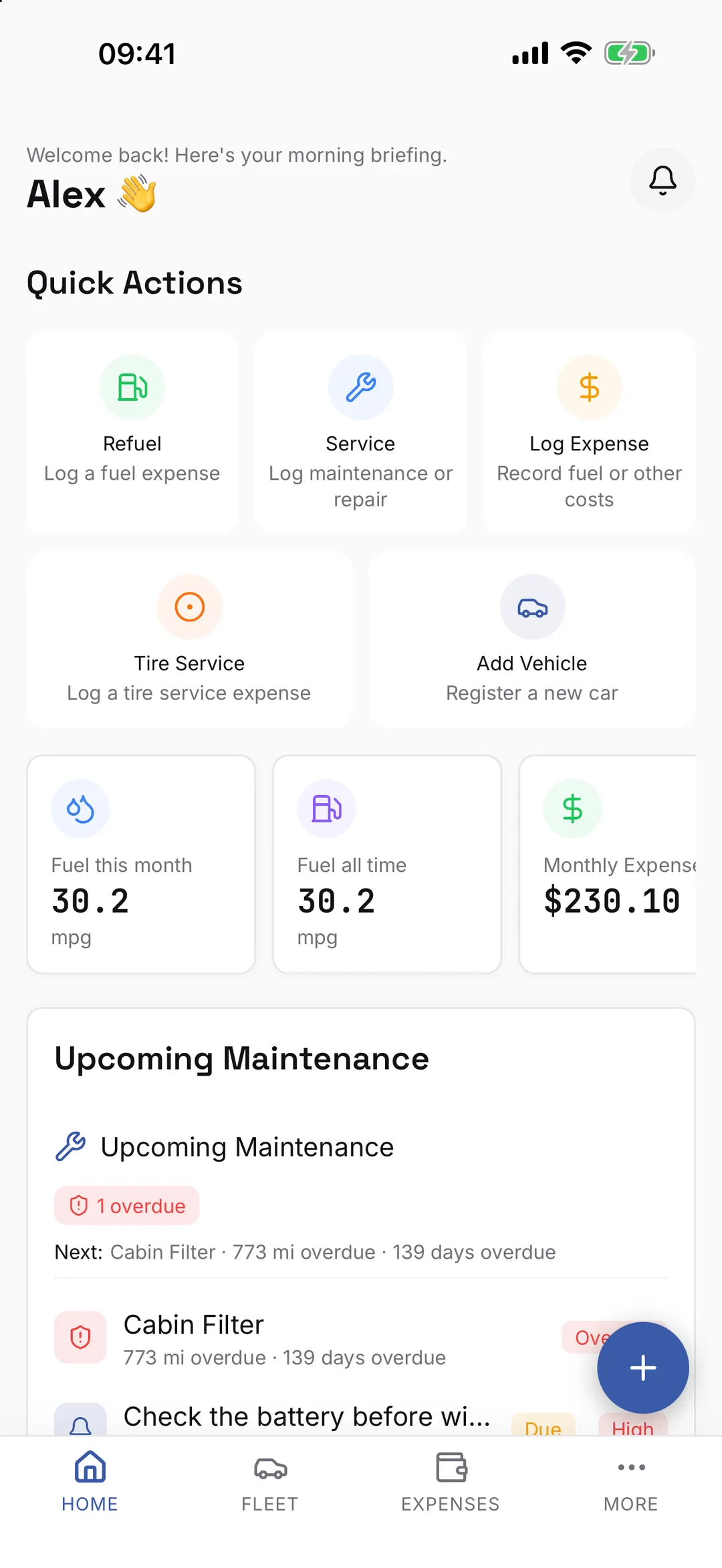
What Car Manager does
Car Manager keeps everything about your car in one place: expenses, maintenance, mileage and fill-ups.
| Task | What Car Manager does |
|---|---|
| Expenses | Log every cost: gas, repairs, insurance, parking. Totals per vehicle and for the whole garage |
| Maintenance | A service schedule and reminders for oil changes, tires and other maintenance, matched to the vehicle type |
| Your own reminders | Recurring ones by mileage, operating hours or time. One-time ones by a date, mileage, operating hours or the next service |
| Mileage and fill-ups | Mileage from odometer readings, and fuel economy from your fill-ups |
| History | The full service history of each vehicle in one place |
| Multiple vehicles | Cars, motorcycles and scooters in one garage |
| With your family | Shared access to vehicles for family members |
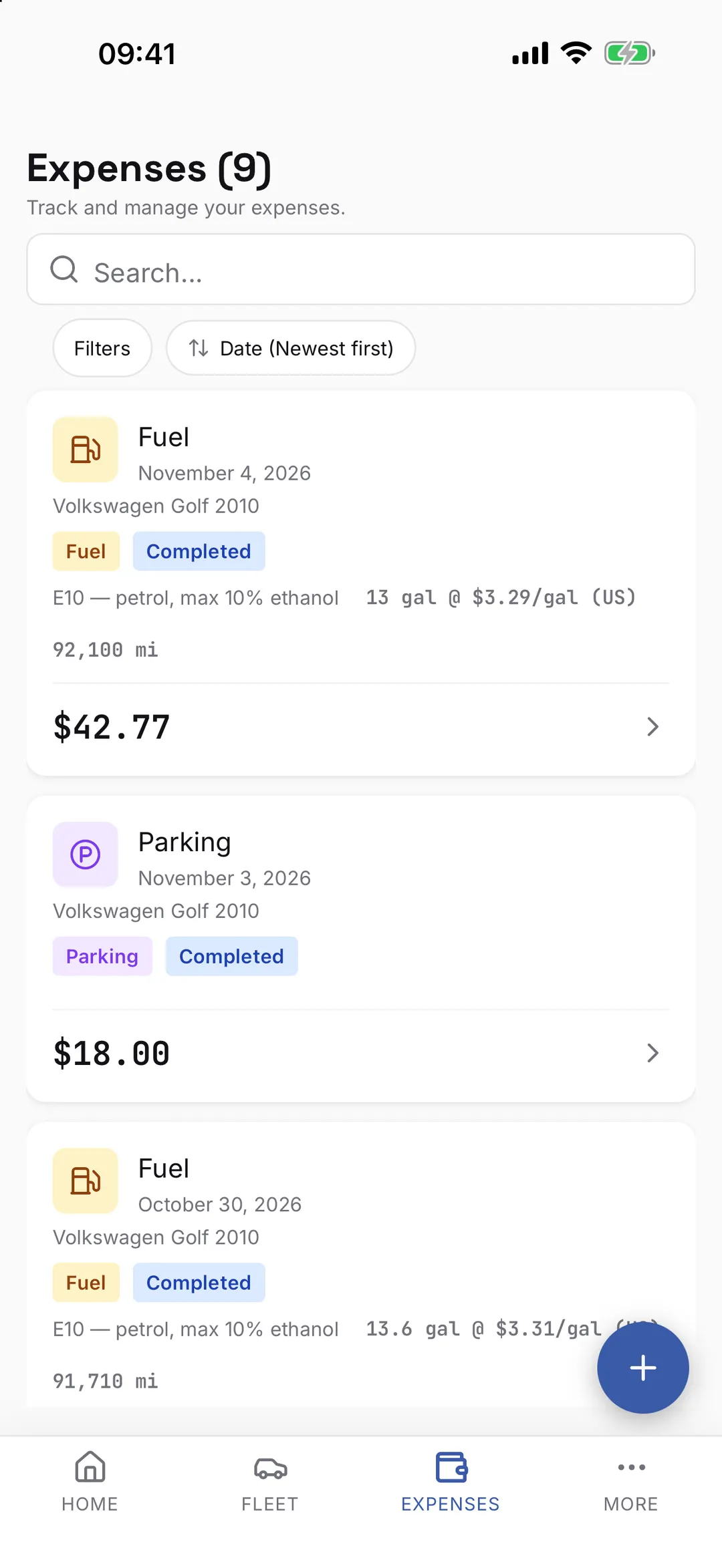
Expenses: what your car really costs
Car Manager shows what each vehicle costs you: every expense on it, the total per month or per year, and the total for the whole garage.
Every cost, whether a fill-up, a repair, an insurance payment or parking, takes a few seconds to log. A fill-up entry shows the gallons, the price per gallon and the odometer reading, and the home screen shows your fuel economy for the month and for all time.
- Multiple currencies. Log a cost in any currency, and Car Manager converts the totals at an automatic exchange rate. Handy when you fill up on a road trip to Canada or Mexico.
- Fuel economy. Enter the odometer reading when you fill up, and Car Manager works out your car's real fuel economy in mpg or L/100 km.
Maintenance and service reminders
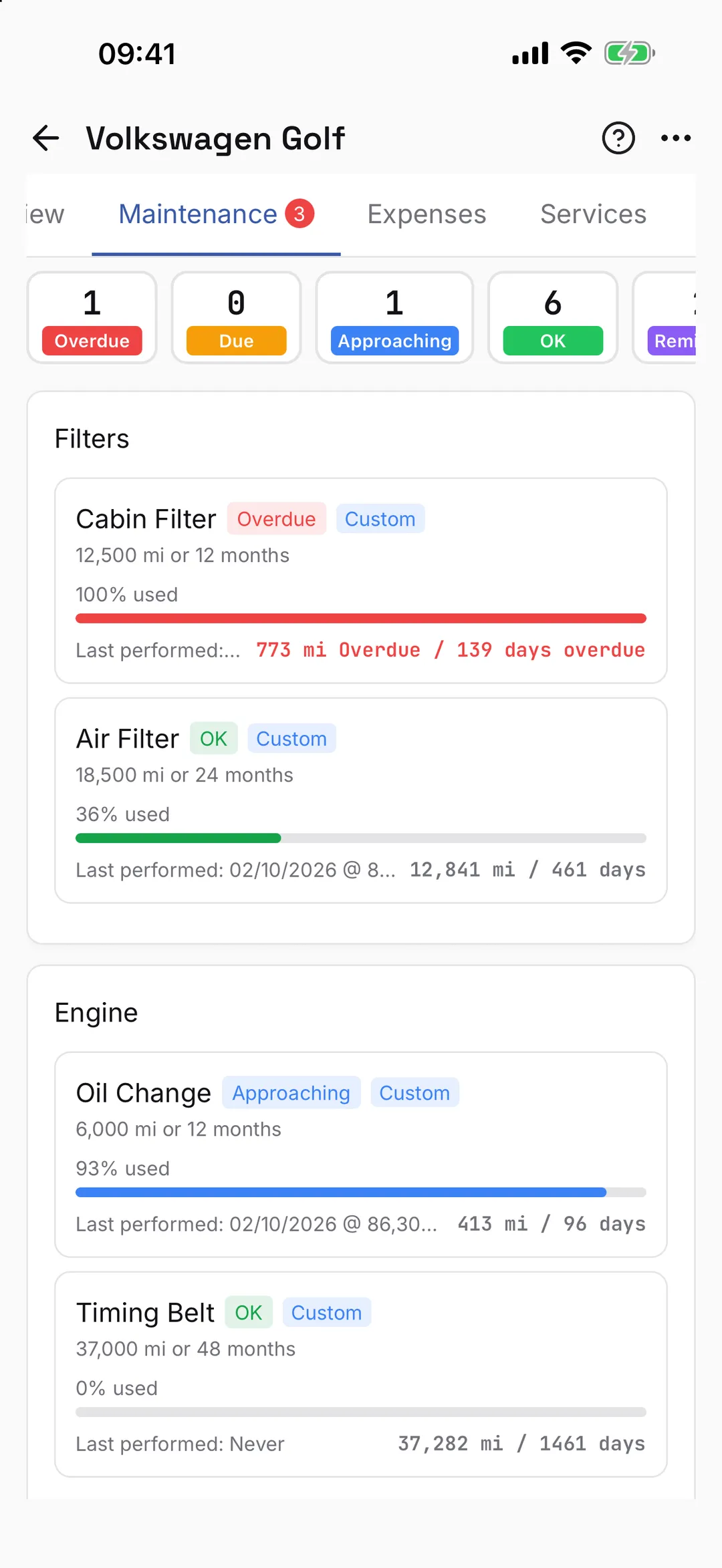
Car Manager keeps a maintenance schedule for each vehicle and reminds you when it's time to change the oil, filters, tires and other wear items.
For each job, the schedule shows how much of the interval is used up and a status: "OK", "Approaching" or "Overdue". For example, if the cabin air filter was last changed 13,200 miles ago and is now 773 miles past due, the job is marked as overdue.
- A schedule that fits your model. If Car Manager recognizes your model, the maintenance schedule is filled in automatically. If not, you can set the intervals yourself.
- Your own recurring reminders. Give any job its own interval: every N miles or kilometers, operating hours or months. One condition is enough, and if you set several, the reminder fires on whichever comes first. Operating hours are available for vehicles with hour tracking turned on.
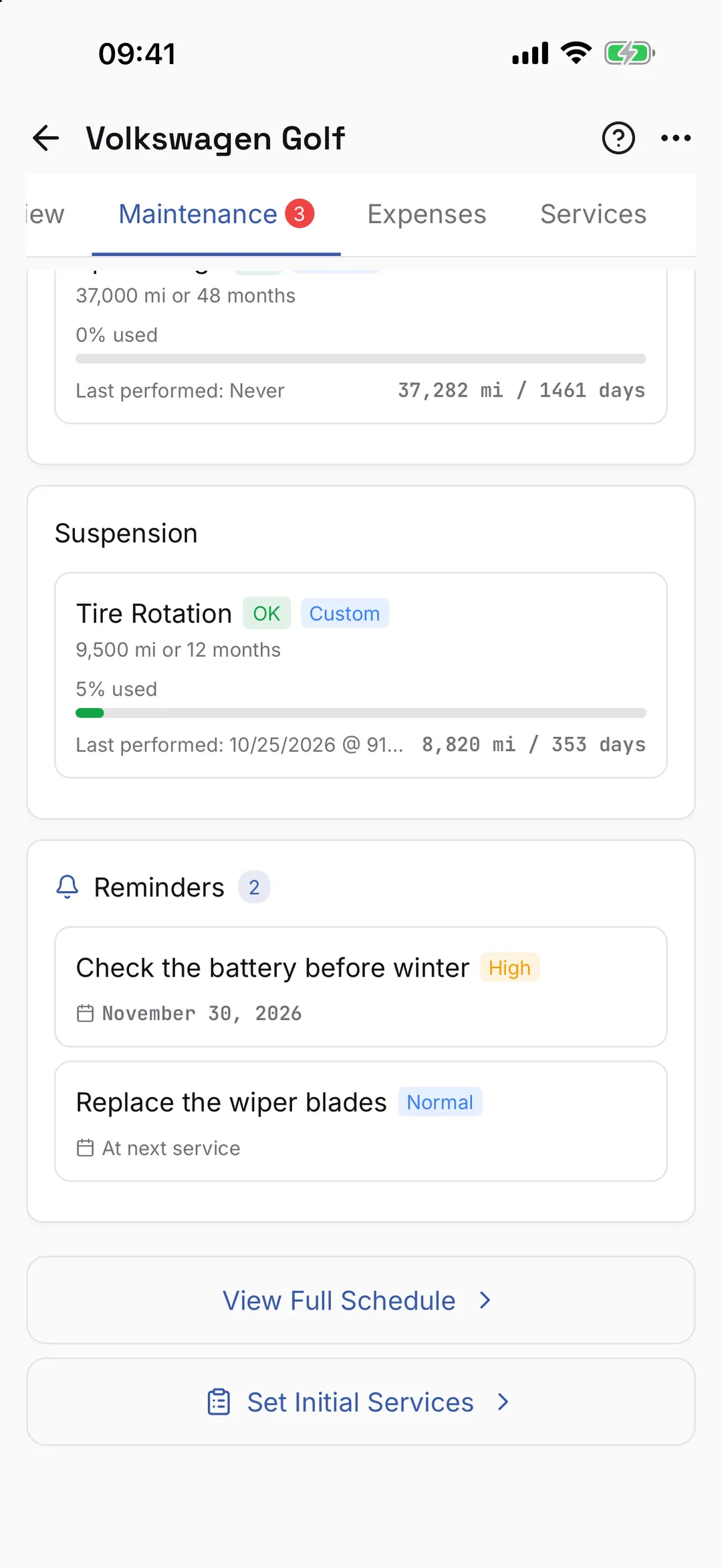
- One-time reminders. Need to replace the wiper blades, test the battery before winter or get that clunk in the suspension checked? Create a One-time Reminder in Car Manager for a date, a mileage, an operating-hours reading, or At next service. When you log the expense and tick that job in it, the reminder closes by itself.
- Insurance. In Car Manager you can turn on a reminder before your auto insurance policy expires.
- Reminders come to you. Car Manager tells you about upcoming maintenance with a push notification on your phone, an email and a notice inside the app.
With your family
In Car Manager the whole family can share one car: everyone sees the shared entries and adds their own.
If you're not the only one driving the car, invite your family by email. Every family member sees all the shared vehicles with their expenses, maintenance and mileage, and can add entries too. Our step-by-step guide How to get started with Car Manager shows how to sign up, add your first car and invite your family.
Lending a car. In Car Manager you can transfer a vehicle for a set period, for example to a relative who borrows it for a week. For the recipient to log expenses and mileage themselves, they need a Car Manager account and an invitation to your family. They don't need a family of their own or a business account. A transfer has an end date, the car comes back afterwards, and its whole history stays with it.
Selling a car. If you've sold your car, delete it from your garage in Car Manager. When you delete it, Car Manager asks what to pass on to the next owner: the history without amounts and shop names, or the full history. When the new owner adds the car to Car Manager by its VIN, they can import that history, and the entries will show "previous owner" as the author, not you.
Where it works
Car Manager is available on the web, on the App Store and on Google Play. One account works on every device: an expense you log on your phone shows up in the browser right away, and the other way around.
9 languages, miles or kilometers.
Needs a connection. Car Manager needs internet to save an entry: without a connection, an expense or a mileage reading won't save.
Your data. Car Manager is hosted in the EU. We don't sell your data or show ads.
For business
Car Manager has a separate Business mode for companies: roles (owner, manager, driver), driver shifts with odometer readings and automatic mileage, expense approvals and fleet reports. This guide is about personal use; Business mode is covered in Small business fleet management in Car Manager. You can create a business account when you sign up on the web or in the Android app.
Pricing
You can use Car Manager for free: the free plan has no time limit and doesn't need a credit card.
| Plan | Vehicles | Family members |
|---|---|---|
| Free | 1 | 2 |
| Family Basic | 3 | 4 |
| Family Pro | 5 | 6 |
Paid plan prices are on the Car Manager pricing page.
FAQ
Is Car Manager free? Yes, Car Manager has a free plan with no time limit and no credit card. Paid plans add more vehicles and members.
Can I use Car Manager on my phone and in the browser? Yes. You have one Car Manager account, and your data syncs across the browser, iPhone and Android.
Does Car Manager work offline? No. Car Manager needs an internet connection to save entries: without one, an expense or a mileage reading won't save.
Can I set up my own reminders in Car Manager? Yes. Recurring reminders in Car Manager run on mileage, operating hours or months; one-time reminders are set for a date, a mileage, an operating-hours reading or the next service.
Does Car Manager work for a motorcycle or scooter? Yes. In Car Manager you can track a motorcycle's or scooter's expenses, mileage and fill-ups and keep a service log with reminders that fit the vehicle.
What happens to my data if I delete my Car Manager account? Car Manager doesn't delete your account right away: for 90 days you can cancel the deletion, and you'll get reminder emails during that time. After that, the account can no longer be signed in to and your name and email address are removed. Vehicles, expenses and service history stay in the family, so its members still see them, now credited to "Deleted user".
Try Car Manager: download for iPhone · download for Android · open in your browser